Deployment, tips and anti-patterns
1. Physical Deployment and Hardware Topology
In standard enterprise and web applications, software containers run inside virtual machines, cloud instances, or Kubernetes pods. In connected IoT and embedded systems, software containers run on specific silicon packages, connected by printed circuit board (PCB) traces. They are powered by batteries or energy-harvesting circuits, and subject to real-world electrical constraints.
A C4 Deployment Diagram bridges software containers to their physical hardware execution environment.
A. Physical Architecture Overview
The Smart Environmental Sensor runs its firmware container on an STM32U575 microcontroller and reads the BME688 sensor over an I2C bus. It logs offline data to an external SPI NOR Flash, and transmits over an integrated 2.4 GHz radio:

Physical Deployment and Electrical Topology diagram mapping software containers to hardware silicon, power rails, and peripheral buses.
B. PlantUML C4 Deployment Diagram
The PlantUML deployment model below formalises the physical hardware topology of the device and the cloud infrastructure:
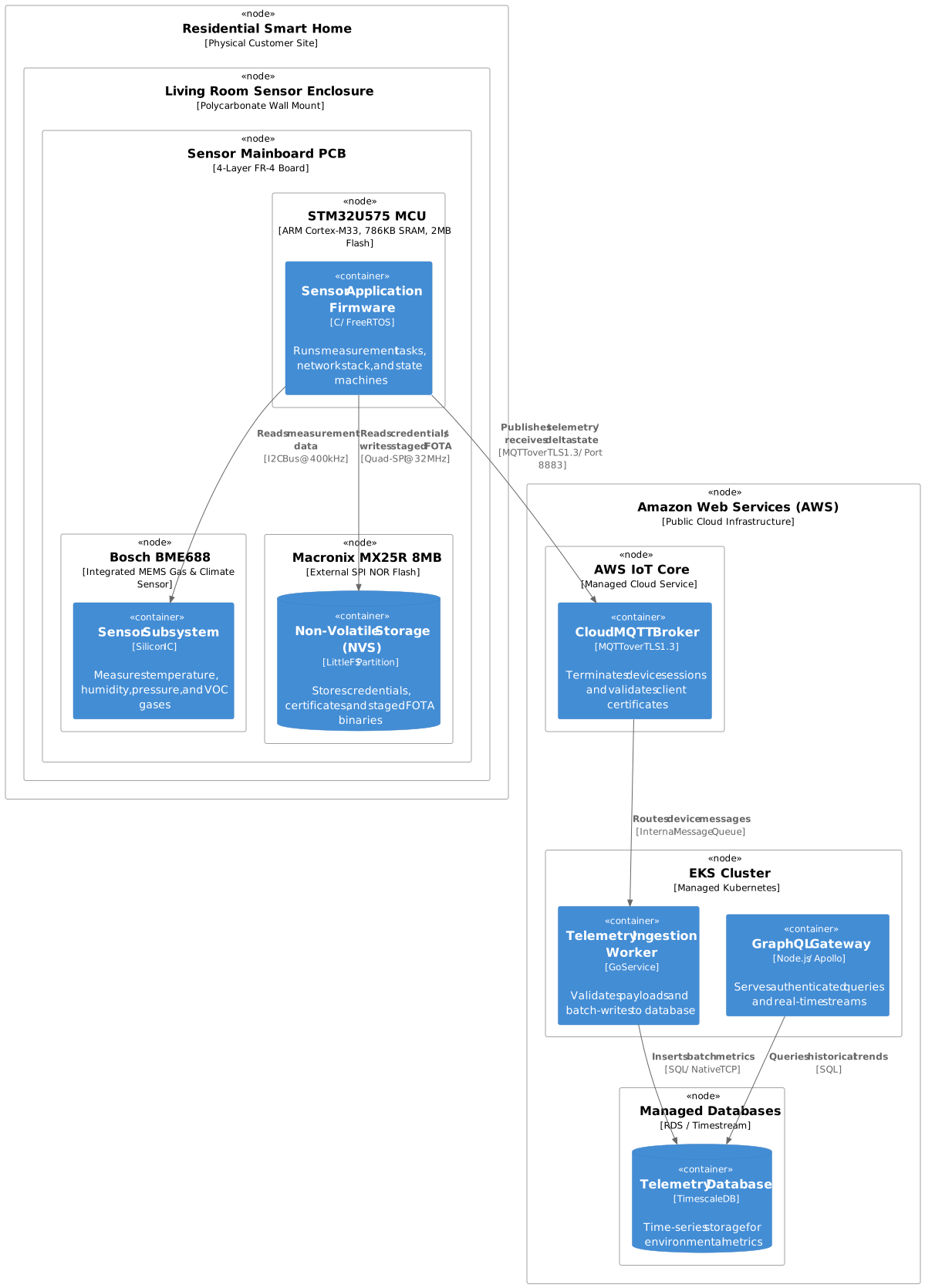
PlantUML C4 Deployment diagram showing edge hardware packaging and cloud infrastructure hosting.
2. Dynamic Sequences: Modelling Time and Lifecycles
While standard C4 diagrams capture static relationships, connected IoT systems are inherently dynamic. Microcontrollers sleep for 99% of their lifespan to conserve energy, waking periodically to measure sensors, negotiate Wi-Fi associations, publish MQTT telemetry, and immediately return to low-power sleep.
A C4 Dynamic Diagram or UML sequence diagram illustrates this runtime sequence:
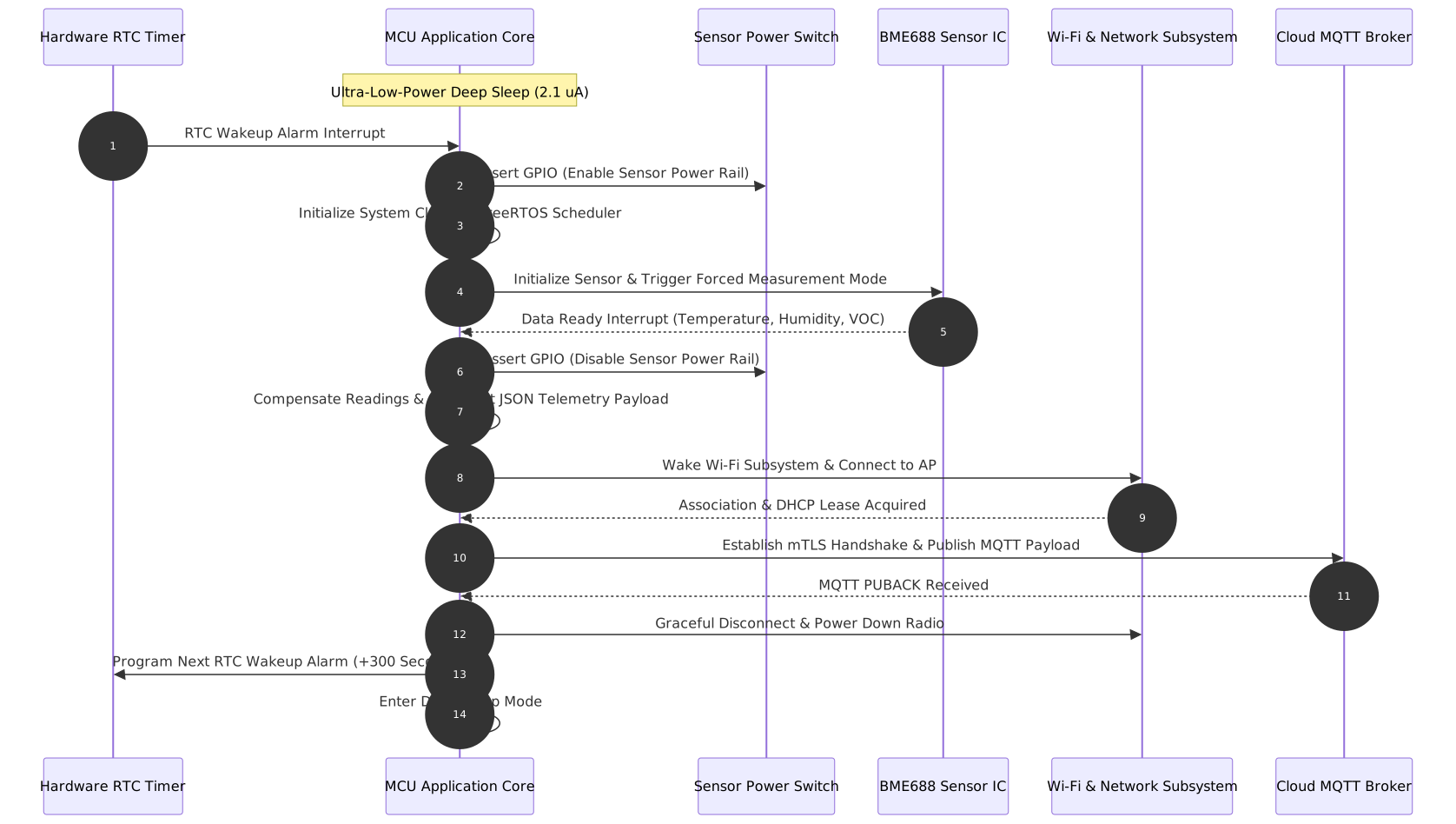
Sequence diagram illustrating the sensor acquisition, network transmission, and power-gating lifecycle.
3. Practical Architecture Tips & Tricks for IoT Teams
A. Establish Clear Layer Boundaries
Avoid mixing physical electronics schematics with logical firmware components:
- Level 2 (Containers): Treat the running firmware binary as a software execution unit. Do not draw GPIO pins or pull-up resistors here.
- Level 3 (Components): Focus on software modules, RTOS tasks, message queues, and HAL drivers.
- Physical Deployment: Place the PCB, connectors, bus routing, and power supplies strictly in the Deployment view.
B. Make Communication Protocols Explicit
An unlabelled arrow in an IoT architecture diagram is a major risk. Every relationship arrow must explicitly state:
- The application protocol (for example, MQTT, CoAP, HTTPS, Matter, Modbus).
- The security transport layer (for example, TLS 1.3, DTLS 1.2, AES-128-CCM, plaintext).
- The physical or network carrier (for example, Wi-Fi 802.11 b/g/n, BLE 5.2, Thread, Ethernet, I2C, SPI, UART).
C. Automate Diagram Validation in CI/CD
Prevent architecture diagrams from becoming obsolete by integrating validation into your development pipeline:
# Example GitHub Actions step
- name: Validate C4 Structurizr Model
  run: |
    docker run --rm -v $(pwd):/workspace structurizr/cli \
      validate -w /workspace/docs/guides/c4-model-guide/workspace.dsl
Using tools like tools/docs-check/check_docs.py and pre-commit hooks ensures that all referenced diagram files, links, and versions are automatically verified whenever code changes are committed.
4. Architectural Anti-Patterns to Avoid
When architecting connected systems, watch for these common pitfalls:
| Anti-Pattern | Description | Impact | Recommended Solution |
|---|---|---|---|
| The “Everything is a Container” Trap | Modelling every C source file, module, or struct as a container at Level 2. | Diagrams become unreadable and lose architectural abstraction. | Restrict containers strictly to separate binaries, isolated cores, auxiliary chips, or storage media. Source modules belong at Level 3. |
| The “Passive Wire” Trap | Drawing connecting arrows without labelling the protocol, baud rate, or security transport. | Leaves firmware and cloud teams guessing at message formats and authentication requirements. | Always label relations with protocol and payload (for example, [MQTT over mTLS 1.3 / Port 8883], [I2C @ 400 kHz]). |
| The “Black Box Cloud” Fallacy | Drawing the entire cloud platform as a single monolithic circle labelled “Cloud”. | Hides critical latency, scaling bottlenecks, ingestion brokers, and database boundaries. | Decompose the cloud into distinct containers: Ingestion Broker, Processing Services, Time-Series Storage, and User APIs. |
| Conflating Physical and Logical | Showing PCB copper traces and power supplies on a Level 2 software container diagram. | Confuses software developers who need to understand data flow and execution logic. | Keep Level 2 focused on software execution and storage units. Move electrical and PCB wiring to a dedicated Physical Deployment diagram. |
| Hardware Omission | Pretending embedded software executes in an environment with infinite RAM, persistent power, and zero latency. | Leads to designs that fail under low-battery, brownout, or intermittent connectivity conditions. | Explicitly model hardware watchdogs, battery constraints, flash write cycles, and offline storage queues. |
| Abandonware Diagrams | Treating diagrams as static slide images drawn once during proposal phases and never updated. | Diagrams become obsolete within weeks, leading to architectural debt and confusion. | Keep diagram source text in version control (using Structurizr DSL or PlantUML). Integrate checks into Git pre-commit hooks. |
Anti-patterns and pitfalls in embedded and connected systems architecture modelling.