Diagrams as code: tooling, DSLs and repository integration
1. The Diagrams-as-Code Paradigm
Historically, engineering teams documented software architectures using visual drawing tools such as Microsoft Visio, Lucidchart, draw.io, or PowerPoint. While graphical editors offer an intuitive drag-and-drop experience, they introduce severe long-term maintenance liabilities in production software environments:
- Opaque Binary Files and Unmergeable XML: Graphical diagram files cannot be easily diffed in pull requests. Two engineers editing the same architecture diagram often encounter irreconcilable merge conflicts.
- Architectural Drift: Because visual drawings live in external web portals or disconnected file shares, developers modify code without updating the architecture diagrams. Within months, documentation becomes obsolete.
- Manual Inconsistency: In a traditional drawing tool, if an MQTT port changes from 1883 to 8883, every single slide and diagram containing that connection must be individually located and manually redrawn.

The architectural evolution from manual visual drawing to version-controlled Diagrams-as-Code.
The Diagrams-as-Code philosophy treats architecture documentation with the same engineering rigor as application source code:
- Architecture diagrams are written in clean, human-readable text.
- Diagrams live inside the same Git repository as the code they describe.
- Every architectural change is reviewed in pull requests alongside code commits.
- Continuous Integration (
CI) pipelines automatically validate, lint, and compile diagrams into high-resolution graphics.
This repository provides comprehensive support for three complementary Diagrams-as-Code technologies: PlantUML, Mermaid, and Structurizr DSL.
2. PlantUML & the C4-PlantUML Standard
PlantUML is a mature, open-source diagramming engine that converts plain text definitions into vector graphics (SVG) and raster images (PNG) using Graphviz.
A. How C4-PlantUML Works
Standard PlantUML focuses on traditional UML class, sequence, and component diagrams. To support C4 modelling, the open-source community created C4-PlantUML—a comprehensive library of pre-processor macros that provide native C4 visual styles, shapes, and connection semantics.
In this repository, C4-PlantUML templates are vendored under templates/: - templates/C4_Context.puml: Level 1 System Context definitions. - templates/C4_Container.puml: Level 2 Container definitions. - templates/C4_Component.puml: Level 3 Component definitions. - templates/C4_Deployment.puml: Level 4 Physical Deployment definitions.
B. Core C4-PlantUML Macro Reference
The primary macros provided by the library include:
| Macro | Arguments | Purpose |
|---|---|---|
Person(alias, label, desc) |
alias, "Display Name", "Description" |
Defines a human actor. |
System(alias, label, desc) |
alias, "Display Name", "Description" |
Defines an internal software system. |
System_Ext(alias, label, desc) |
alias, "Display Name", "Description" |
Defines an external, third-party software system. |
Container(alias, label, tech, desc) |
alias, "Display Name", "Technology", "Description" |
Defines a software container (for example, firmware, microservice, or web application). |
ContainerDb(alias, label, tech, desc) |
alias, "Display Name", "Technology", "Description" |
Defines a data store or persistent storage partition. |
Component(alias, label, tech, desc) |
alias, "Display Name", "Technology", "Description" |
Defines a structural software component within a container. |
Rel(from, to, label, tech) |
from, to, "Action / Intent", "Protocol / Transport" |
Connects two elements with an explicit directional relationship. |
System_Boundary(alias, label) { ... } |
alias, "Boundary Name" |
Groups containers logically within a system boundary. |
Container_Boundary(alias, label) { ... } |
alias, "Boundary Name" |
Groups components logically within a container boundary. |
Deployment_Node(alias, label, type) { ... } |
alias, "Node Name", "Hardware / Infrastructure Type" |
Defines a physical enclosure, PCB, or cloud hosting environment. |
Core C4-PlantUML macro reference.
C. PlantUML Examples Across the Top 3 C4 Levels
Below are concise, copy-pasteable PlantUML examples demonstrating how to author each of the top three C4 levels:
Level 1: System Context in PlantUML
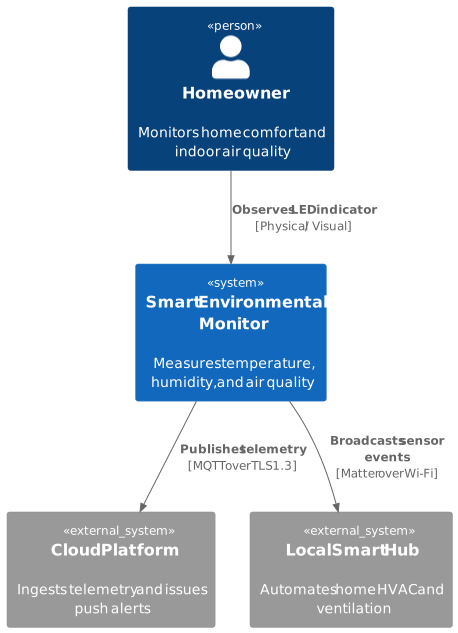
PlantUML Level 1 System Context diagram.
Level 2: Containers in PlantUML
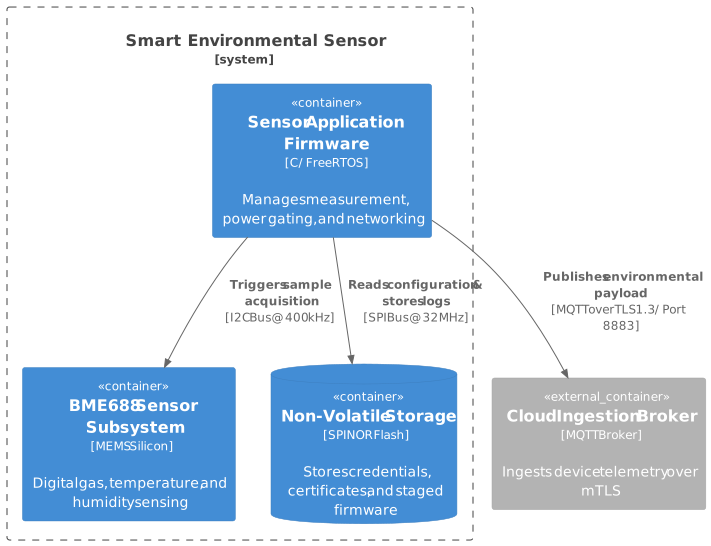
PlantUML Level 2 Container diagram.
Level 3: Components in PlantUML
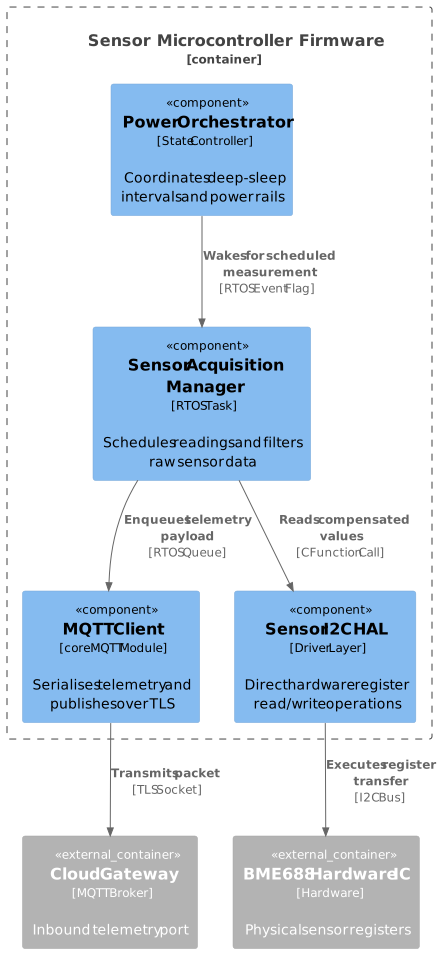
PlantUML Level 3 Component diagram.
D. Repository Tooling and Automation
This repository provides seamless tooling to build, preview, and test PlantUML diagrams:
- Native Windows Batch Wrapper (
tools/bin/plantuml.cmd): Allows executingplantumlfrom any command prompt on Windows without configuring manual Java classpath commands. - Documentation Site Rendering (
mkdocs.yml): Theplantuml_markdownextension parses ```plantuml fences in markdown files and compiles them into crisp vector SVGs at documentation build time. - Document Generator (
createdocs.py): When building formal DOCX or PDF engineering manuals,createdocs.pyautomatically executestemplates/plantuml.jarto render and inline all diagrams into the final document.
3. Mermaid: Lightweight Markdown-Native Diagramming
Mermaid is a JavaScript-based diagramming library designed to render directly inside web browsers.
A. Strengths of Mermaid
- Native GitHub and Web Support: GitHub, GitLab, and MkDocs render Mermaid diagrams natively without requiring any local compiler, Java runtime, or Graphviz installation.
- Zero Toolchain Overhead: Anyone reading documentation in a web browser or reviewing a pull request sees interactive diagrams rendered instantly.
- Broad Diagram Type Support: Mermaid supports flowcharts (
flowchart TD), sequence diagrams (sequenceDiagram), state machines (stateDiagram-v2), and Gantt timelines.
B. Mermaid Examples Across the Top 3 C4 Levels
While Mermaid does not feature built-in C4 macros like PlantUML, you can cleanly model C4 abstractions using Mermaid’s flowchart and subgraph syntax across all three levels:
Level 1: System Context in Mermaid

Mermaid Level 1 System Context diagram.
Level 2: Containers in Mermaid

Mermaid Level 2 Container diagram.
Level 3: Components in Mermaid

Mermaid Level 3 Component diagram.
C. Limitations of Mermaid
- Lack of C4 Semantic Enforcement: Mermaid treats all nodes as generic flowchart vertices. It does not enforce person shapes, database cylinders, or formal C4 container styling unless manually configured with custom CSS classes.
- Automated Layout Constraints: Mermaid computes diagram layout dynamically in the browser. In complex diagrams with hundreds of nodes, layout engines (such as dagre) can produce overlapping links.
4. Structurizr DSL: Model-First Architecture as Code
While PlantUML and Mermaid are diagram-first tools, the Structurizr DSL represents a paradigm shift: Model-First Architecture as Code.

Diagram-First vs Model-First architectural modelling.
A. The Core Principle: Separation of Model from Presentation
In a diagram-first tool, each diagram file is an isolated graphic. If you change a database technology from SQLite to LittleFS, or update an MQTT endpoint, you must locate and modify every individual diagram file.
In the Structurizr DSL, you define the architecture once in a single conceptual model: 1. The Model (model): Declares people, software systems, containers, components, deployment nodes, and their relationships. 1. The Views (views): Declares which subsets of the model to visualise (for example, a Context view showing only external systems, a Container view, or a Component view showing internal modules). 1. The Styles (styles): Decouples visual presentation (colours, shapes, icons) from the architectural topology.
B. Structurizr DSL Grammar Across the Top 3 Levels
A complete Structurizr workspace file demonstrates the top three C4 levels defined within a single model and projected as individual views:
workspace "Smart Sensor System" "Model-first architecture example covering top 3 levels" {

    model {
        # ---------------------------------------------------------------------
        # Level 1: People and Software Systems
        # ---------------------------------------------------------------------
        user = person "Homeowner" "Monitors indoor air quality"
        cloud = softwareSystem "Cloud Platform" "IoT ingestion and analytics backend"

        sensor = softwareSystem "Smart Environmental Sensor" "IoT edge device" {
            # -----------------------------------------------------------------
            # Level 2: Containers inside the Software System
            # -----------------------------------------------------------------
            sensorChip = container "Sensor Hardware IC" "Bosch BME688" "Sensor"
            flashStorage = container "NVS Flash Storage" "SPI NOR Flash" "Database"

            sensorFw = container "Application Firmware" "C / FreeRTOS" "Firmware" {
                # -------------------------------------------------------------
                # Level 3: Components inside the Container
                # -------------------------------------------------------------
                acqMgr = component "Sensor Acquisition Manager" "Periodic RTOS Task"
                powerOrch = component "Power Orchestrator" "State Machine Controller"
                mqttClient = component "MQTT Telemetry Client" "coreMQTT Subsystem"
                i2cDriver = component "Sensor I2C Driver" "Peripheral HAL Driver"
            }
        }

        # Relationships across all levels
        user -> sensor "Observes status LED" "Physical / Visual"
        sensor -> cloud "Publishes telemetry" "MQTT over TLS 1.3"

        sensorFw -> sensorChip "Triggers measurement" "I2C @ 400 kHz"
        sensorFw -> flashStorage "Reads credentials" "SPI @ 32 MHz"

        powerOrch -> acqMgr "Signals measurement wake" "RTOS Event Flag"
        acqMgr -> i2cDriver "Reads data registers" "C Function API"
        i2cDriver -> sensorChip "Executes I2C transfer" "I2C Bus"
        acqMgr -> mqttClient "Enqueues telemetry payload" "RTOS Queue"
        mqttClient -> cloud "Transmits packet" "TLS Socket"
    }

    views {
        # Level 1 View: System Context
        systemContext sensor "Level1_Context" "System Context showing user, sensor, and cloud platform" {
            include *
            autoLayout lr
        }

        # Level 2 View: Containers
        container sensor "Level2_Containers" "Container diagram of the Smart Environmental Sensor" {
            include *
            autoLayout tb
        }

        # Level 3 View: Components
        component sensorFw "Level3_Components" "Component diagram of the application firmware" {
            include *
            autoLayout tb
        }

        styles {
            element "Person" {
                shape Person
                background #08427b
                color #ffffff
            }
            element "Software System" {
                background #1168bd
                color #ffffff
            }
            element "Container" {
                background #438dd5
                color #ffffff
            }
            element "Component" {
                shape Component
                background #5C6BC0
                color #ffffff
            }
            element "Database" {
                shape Cylinder
                background #2E7D32
                color #ffffff
            }
        }
    }
}
Complete Structurizr DSL specification demonstrating Level 1, Level 2, and Level 3 declarations and views.
C. Structurizr tooling with py-doc
The workspace above is in this repository as workspace.dsl. py-doc works with Structurizr workspaces through its c4 commands:
-
Check the model, as a CI dry run:
py-doc c4 check content/guides/c4-model/files/workspace.dsl --strict -
Explore it interactively in Structurizr Local, to zoom from System Context down to Component views and adjust layouts:
py-doc c4 up content/guides/c4-model/files/workspace.dsl -
Export the views as images or diagram source (PlantUML, C4-PlantUML, Mermaid and others) for documents and build pipelines:
py-doc c4 export -f svg mermaid -o build/c4
5. Tooling Selection Matrix
Use the matrix below to select the optimal tool for your project and audience:
| Evaluation Dimension | Mermaid | PlantUML (C4-PlantUML) | Structurizr DSL |
|---|---|---|---|
| Underlying Paradigm | Diagram-First | Diagram-First | Model-First |
| Primary File Format | Markdown fences (``mermaid) | Text files (.puml) or fences | Text file (workspace.dsl) | | **Native GitHub Web Rendering** | Native (client-side in browser) | Requires CI pre-rendering or proxy | Requires export to PNG/SVG/Mermaid | | **C4 Semantic Support** | Generic flowcharts (requires custom classes) | Native macros (Person,Container,Rel`) |
First-class native C4 object model | |
| Multi-View Consistency | Manual (must update every diagram) | Manual (must update every diagram) | Automatic (updates in model flow to all views) |
| Interactive Navigation | Static diagrams | Static diagrams | Interactive web zoom (Structurizr Lite) |
| Local Dependencies | None (renders in browser) | Java and Graphviz | Docker / Java / Python wrapper |
| Best Suited For | READMEs, issue discussions, quick PR diagrams | Formal PDF/DOCX reports, detailed engineering docs | Enterprise and multi-team IoT architectures |
Tooling comparison: Mermaid vs PlantUML vs Structurizr DSL.