Making Sense of Documentation: A Pragmatic Look at the Diátaxis Framework
Good documentation isn’t just an afterthought—it’s a core part of a successful project. Well-structured documentation reduces friction for users, lowers support overhead, and helps developers work more effectively. But too often, documentation is a confusing mess, where tutorials, technical references, and explanations are thrown together with no clear structure.
The Diátaxis framework provides a simple yet powerful approach to solving this problem. By dividing documentation into four distinct types, it ensures that users always know where to find the information they need.
The Four Pillars of Diátaxis
Diátaxis organises documentation into four key types, each with a specific purpose:
1. Tutorials – Learning-Oriented
- Helps users acquire knowledge through step-by-step guidance.
- Assumes no prior experience and walks through practical examples.
2. How-To Guides – Task-Oriented
- Shows users how to apply their knowledge to solve a specific problem.
- Assumes the user has some prior understanding.
3. Reference – Information-Oriented
- A structured, fact-based resource for looking up details.
- Typically includes API documentation, command-line options, and configuration schemas.
4. Explanation – Understanding-Oriented
- Helps users acquire deeper knowledge about the concepts behind a system.
- Provides rationale, context, and trade-offs to support informed decisions.
Each of these documentation types has a specific role in helping users move from learning to mastery.
The Four Dimensions of Documentation
Diátaxis isn’t just about categorising documents—it’s about structuring documentation in a way that supports how people think and learn.
The four documentation types align along two key axes:
1. Acquisition vs. Application
- Acquisition (learning) is about gaining new knowledge. It includes Tutorials and Explanations.
- Application (doing) is about applying knowledge to achieve a goal. It includes How-To Guides and References.
2. Action vs. Cognition
- Action (practical use) covers Tutorials and How-To Guides—things you follow step-by-step.
- Cognition (understanding) covers Explanations and References, helping users think deeply and make informed decisions.
This structured approach ensures that every type of documentation serves a distinct purpose while supporting the user’s journey from beginner to expert.
Why Diátaxis Works
One of the biggest issues with documentation is mixing these types together. When a tutorial starts explaining deep architectural decisions, or a how-to guide is cluttered with background theory, users get lost.
Diátaxis fixes this by ensuring that each document has a single purpose:
- A tutorial should help users get started quickly, not teach system design.
- A how-to guide should help users solve a problem, not introduce concepts from scratch.
- A reference guide should provide facts and details, not instructions.
- An explanation should help users understand, not give them step-by-step guidance.
By keeping these types distinct, documentation becomes clearer, easier to use, and more effective.
Applying Diátaxis to Your Documentation
If your documentation feels messy or difficult to navigate, applying Diátaxis can bring clarity and order. Here’s how:
1. Audit your documentation
- Identify existing documentation and classify it under the four Diátaxis categories.
- Look for overlapping or misplaced content—are tutorials explaining too much theory? Are how-to guides acting as reference docs?
2. Restructure your content
- Separate documentation by type so that each piece serves one purpose.
- Group similar types together to help users find what they need faster.
3. Fill in the gaps
- Most projects lack proper explanations—ensuring conceptual clarity is key.
- Some teams rely too much on reference docs without enough practical how-to guides.
4. Make navigation intuitive
- Clearly label documentation types so users know what to expect.
- Link between different types of documentation, guiding users along their learning path.
When documentation follows this structure, it becomes easier to write, maintain, and—most importantly—use.
Visualising Diátaxis
A helpful way to understand the framework is through a four-quadrant diagram:
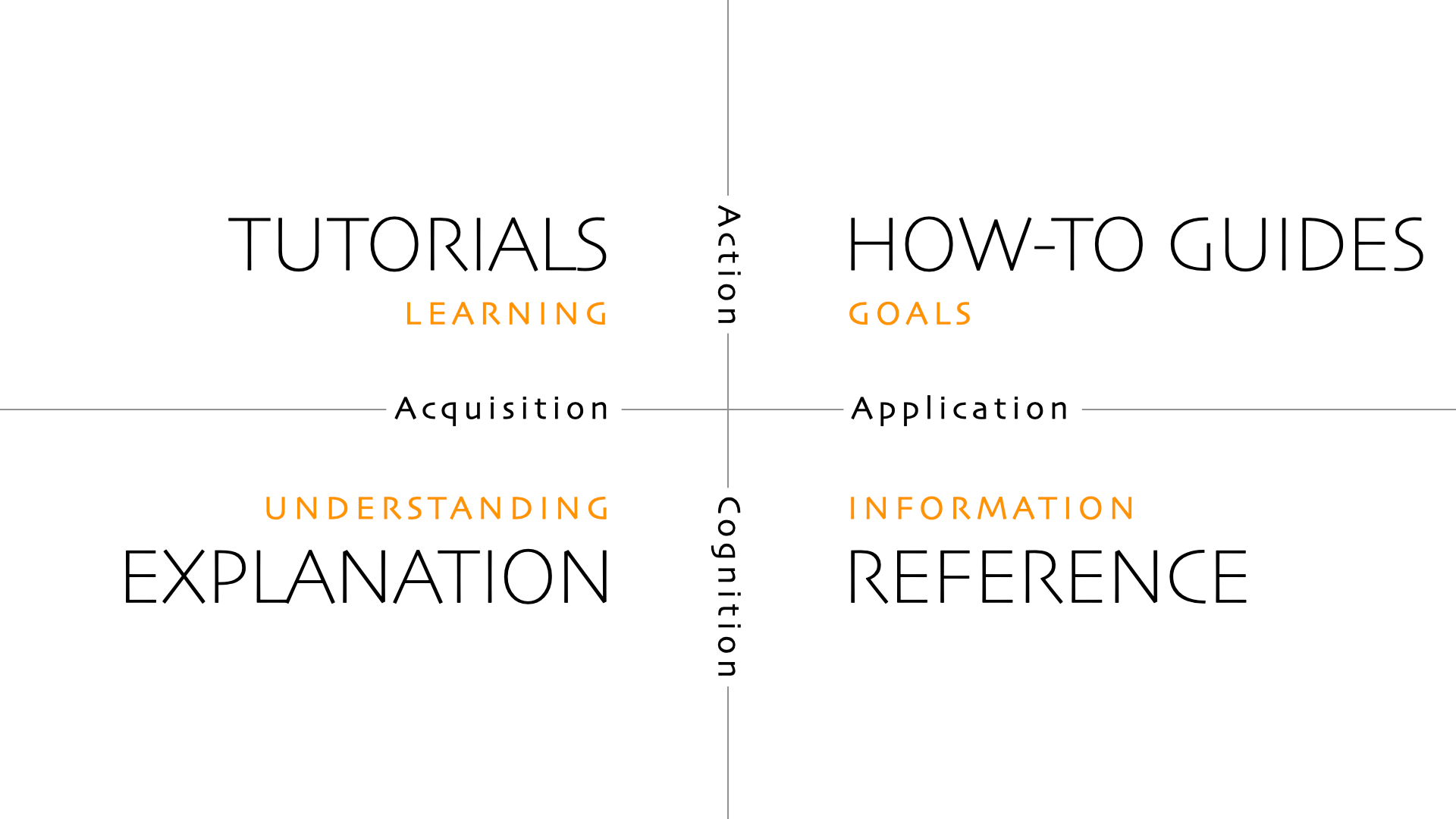
Diagram from diataxis.fr by Daniele Procida, CC BY-SA 4.0.
This visual structure helps reinforce why documentation should be separated and how it supports different learning and usage needs.
Final Thoughts
Diátaxis isn’t about adding more documentation—it’s about organising it effectively.
By following this framework, teams can create documentation that is:
- ✅ Clear – Every piece serves a distinct purpose.
- ✅ Easy to navigate – Users know exactly where to find what they need.
- ✅ More effective – Reduces confusion and improves user experience.
💡 Good documentation isn’t just about writing—it’s about structure. Diátaxis provides that structure.
Next Steps
- 🔹 Review your current documentation—where does it fit within the framework?
- 🔹 Reorganise and separate—make sure each document has a clear purpose.
- 🔹 Improve discoverability—label documentation clearly so users can find what they need.
By taking these steps, you’ll transform your documentation from a confusing sprawl into a powerful knowledge base. 🚀