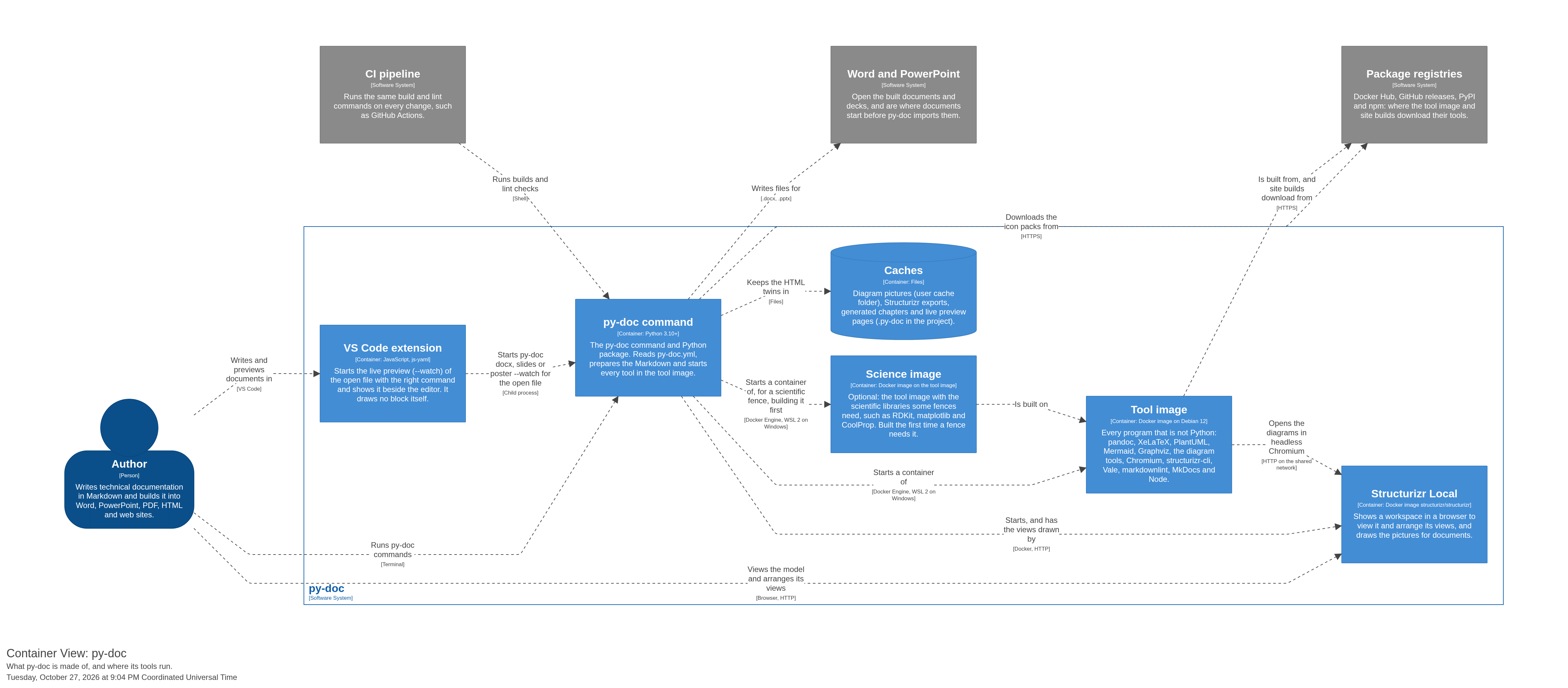
Containers
The containers (applications and data stores) of each system in py-doc.
py-doc
Turns Markdown into Word, PowerPoint, PDF, HTML and web sites, checks the writing, and documents C4 models.
| Container | Technology | Description | Properties |
|---|---|---|---|
| Caches | Files | Diagram pictures (user cache folder), Structurizr exports, generated chapters and live preview pages (.py-doc in the project). | |
| py-doc command | Python 3.10+ | The py-doc command and Python package. Reads py-doc.yml, prepares the Markdown and starts every tool in the tool image. | |
| Science image | Docker image on the tool image | Optional: the tool image with the scientific libraries some fences need, such as RDKit, matplotlib and CoolProp. Built the first time a fence needs it. | |
| Structurizr Local | Docker image structurizr/structurizr | Shows a workspace in a browser to view it and arrange its views, and draws the pictures for documents. | |
| Tool image | Docker image on Debian 12 | Every program that is not Python: pandoc, XeLaTeX, PlantUML, Mermaid, Graphviz, the diagram tools, Chromium, structurizr-cli, Vale, markdownlint, MkDocs and Node. | |
| VS Code extension | JavaScript, js-yaml | Starts the live preview (–watch) of the open file with the right command and shows it beside the editor. It draws no block itself. |
View: Containers
What py-doc is made of, and where its tools run.