Architecture document
An architecture document explains how a system is built and why. It is for the people who will build, test, operate and change the system, so it should answer their questions and stop. Start small: a context diagram, the quality goals and the main decisions are worth more than a hundred pages nobody reads.
Outline
The outline below follows arc42, a free template for architecture documentation by Gernot Starke and Peter Hruschka. Its twelve sections are a checklist of what a reader might need. Leave out a section that has nothing to say, but keep the numbering, so readers always know where to look. The arc42 documentation explains each section, with examples. The official templates, in many formats and languages, are on the arc42 site.
| Section | What it answers |
|---|---|
| 1 Introduction and goals | What the system is for, its main features, the top three to five quality goals, and who the stakeholders are |
| 2 Constraints | What the team must work within: technical, organisational, regulatory and conventions |
| 3 Context and scope | What is inside the system and what is outside, and every external interface, both in business terms and in technical terms |
| 4 Solution strategy | The handful of fundamental decisions that shape everything else, and how they meet the quality goals |
| 5 Building block view | How the system is split into parts, level by level, and what each part is responsible for |
| 6 Runtime view | How the parts work together in the important scenarios, including start-up and failure |
| 7 Deployment view | Which hardware, networks and environments the parts run on |
| 8 Cross-cutting concepts | Rules that apply across many parts: security, logging, error handling, persistence, configuration |
| 9 Architecture decisions | The significant decisions, usually as links to architecture decision records |
| 10 Quality requirements | The quality goals made measurable, as quality scenarios |
| 11 Risks and technical debt | What could go wrong, and what we already know needs fixing |
| 12 Glossary | The domain and technical terms, so everyone uses the same words |
The twelve sections of an architecture document.
Review the document with the architecture review checklist.
C4 diagrams
The C4 model, by Simon Brown, draws a system at four levels of zoom: system context, containers, components and code. Sections 3, 5 and 7 of the outline map onto its context, container and deployment diagrams. Most systems need only the first two levels.
C4 in PlantUML
C4-PlantUML adds C4 shapes to PlantUML. Its standard library ships with PlantUML, so !include <C4/C4_Context> needs no download. Copy this starter and replace the names.
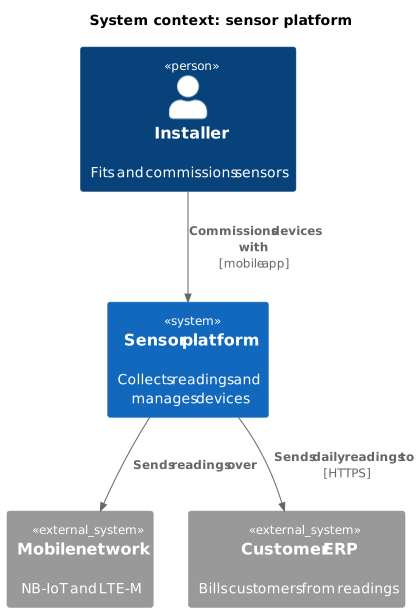
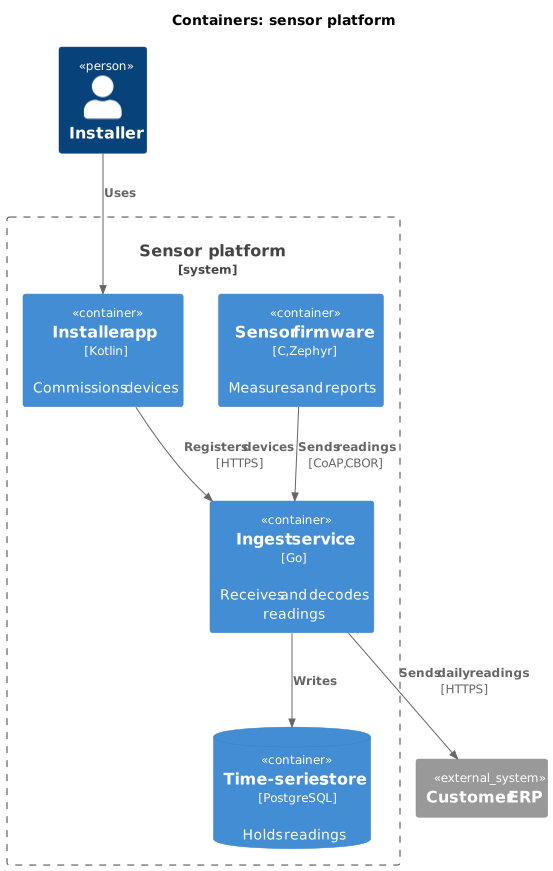
The other levels use <C4/C4_Component>, <C4/C4_Deployment> and <C4/C4_Dynamic> in the same way.
C4 in Structurizr
For anything bigger than a few diagrams, keep one model and draw every view from it. Then a name changed in the model changes in every diagram. Structurizr does this with a model written in its own domain-specific language (DSL), and py-doc can turn a Structurizr workspace into chapters and pictures. This starter describes the same system as the diagrams above. Download c4-workspace.dsl.
workspace "Sensor platform" "Starter C4 model" {

    model {
        installer = person "Installer" "Fits and commissions sensors."
        erp = softwareSystem "Customer ERP" "Bills customers from readings." "External"

        platform = softwareSystem "Sensor platform" "Collects readings and manages devices." {
            device = container "Sensor firmware" "Measures and reports." "C, Zephyr"
            ingest = container "Ingest service" "Receives and decodes readings." "Go"
            store = container "Time-series store" "Holds readings." "PostgreSQL" "Database"
            app = container "Installer app" "Commissions devices." "Kotlin"
        }

        installer -> app "Uses"
        app -> ingest "Registers devices with" "HTTPS"
        device -> ingest "Sends readings to" "CoAP, CBOR"
        ingest -> store "Writes readings to"
        ingest -> erp "Sends daily readings to" "HTTPS"
    }

    views {
        systemContext platform "Context" {
            include *
            autoLayout
        }
        container platform "Containers" {
            include *
            autoLayout
        }
        styles {
            element "Person" {
                shape Person
            }
            element "Database" {
                shape Cylinder
            }
            element "External" {
                background #999999
            }
        }
    }
}